10 Best Long Range WiFi Routers for 2026 (Blazing-Fast Coverage)
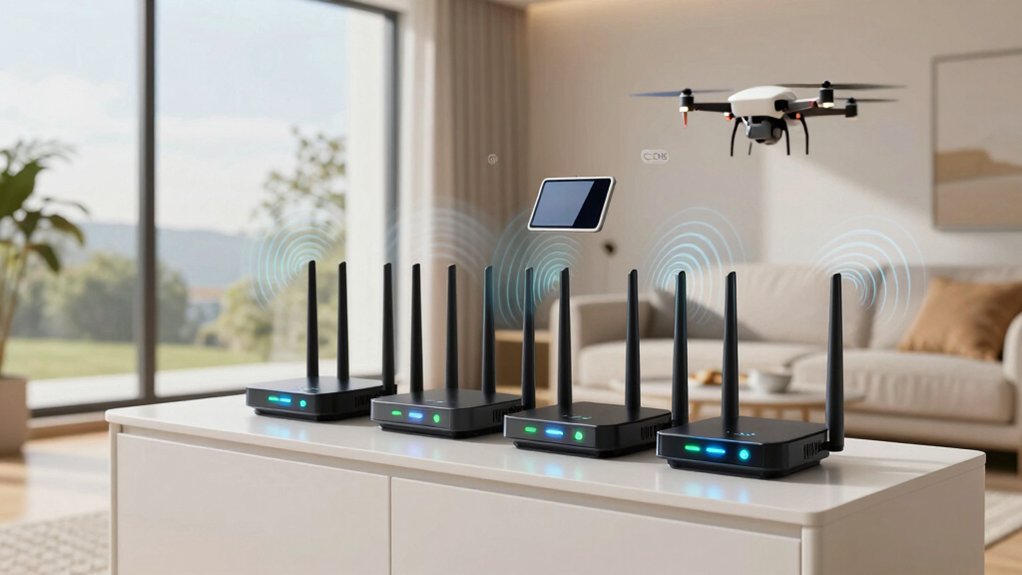
You want blazing-fast coverage across your whole home, and TP-Link’s Wi-Fi 6, 6E, and 7 routers deliver with powerful range and speed. Models like the AX1800, AXE5400, and Archer BE400 use high-gain antennas, beamforming, and multi-band tech to eliminate dead zones.
With MU-MIMO, OFDMA, and tri/quad-band support, these routers handle heavy loads effortlessly. You’ll enjoy seamless streaming, gaming, and connectivity: especially when your devices match the latest Wi-Fi standards. There’s more to discover about maximizing performance.
| TP-Link AX1800 WiFi 6 Router (Archer AX21) |  | Best Budget Wi-Fi 6 | WiFi Standard: WiFi 6 | Bands: Dual Band | Max Speed (Mbps): 1800 | VIEW LATEST PRICE | Read Our Analysis |
| TP-Link AXE5400 WiFi 6E Router |  | Premium Wi-Fi 6E Pick | WiFi Standard: WiFi 6E | Bands: Tri-Band | Max Speed (Mbps): 5400 | VIEW LATEST PRICE | Read Our Analysis |
| TP-Link Archer BE400 Wi-Fi 7 Router |  | Best Wi-Fi 7 Value | WiFi Standard: WiFi 7 | Bands: Dual Band | Max Speed (Mbps): 6452 | VIEW LATEST PRICE | Read Our Analysis |
| TP-Link AX6000 Wi-Fi 6 Router (Archer AX80) | 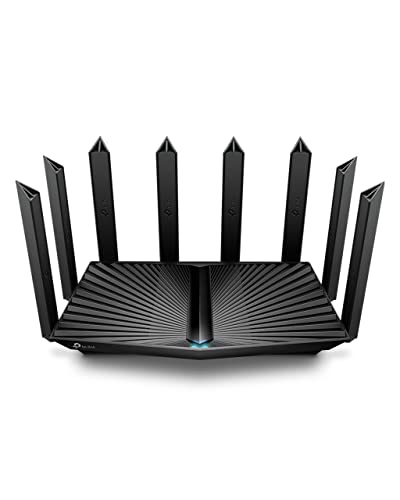 | High-Performance Leader | WiFi Standard: WiFi 6 | Bands: Dual Band | Max Speed (Mbps): 6000 | VIEW LATEST PRICE | Read Our Analysis |
| TP-Link AC1200 WiFi Router (Archer A6) |  | Most Affordable Option | WiFi Standard: WiFi 5 | Bands: Dual Band | Max Speed (Mbps): 1200 | VIEW LATEST PRICE | Read Our Analysis |
| TP-Link AX5400 WiFi 6 Router |  | Best Mid-Range Performer | WiFi Standard: WiFi 6 | Bands: Dual Band | Max Speed (Mbps): 5400 | VIEW LATEST PRICE | Read Our Analysis |
| NETGEAR Nighthawk WiFi 7 Router (RS90) |  | Top Wi-Fi 7 Contender | WiFi Standard: WiFi 7 | Bands: Dual Band | Max Speed (Mbps): 3600 | VIEW LATEST PRICE | Read Our Analysis |
| TP-Link Tri-Band WiFi 7 Router (Archer BE550) |  | Ultimate Speed King | WiFi Standard: WiFi 7 | Bands: Tri-Band | Max Speed (Mbps): 9200 | VIEW LATEST PRICE | Read Our Analysis |
| TP-Link Archer BE260 WiFi 7 Router |  | Future-Proof Favorite | WiFi Standard: WiFi 7 | Bands: Dual Band | Max Speed (Mbps): 5000 | VIEW LATEST PRICE | Read Our Analysis |
| GL.iNet Flint 3 WiFi 7 Router |  | Best for Power Users | WiFi Standard: WiFi 7 | Bands: Tri-Band | Max Speed (Mbps): 9000 | VIEW LATEST PRICE | Read Our Analysis |
More Details on Our Top Picks
TP-Link AX1800 WiFi 6 Router (Archer AX21)
Looking for a reliable long-range router that handles multiple devices without breaking a sweat? The TP-Link AX1800 WiFi 6 Router (Archer AX21) delivers. You get Wi-Fi 6 speed with AX1800 bandwidth: up to 1.8 Gbps, so streaming, gaming, and video calls stay smooth.
OFDMA and Beamforming let you connect more devices without lag, while four high-gain antennas extend coverage. It works with any ISP and integrates with Alexa. You also get 24/7 support, a 2-year warranty, and free firmware updates via the Tether app.
TP-Link’s CISA-signed security keeps your network safe. Buy with confidence: you’ve got expert help whenever you need it.
- WiFi Standard:WiFi 6
- Bands:Dual Band
- Max Speed (Mbps):1800
- Coverage (sq ft):Not specified
- Security Suite:TP-Link Cybersecurity
- 2.5G Port:No
- Additional Feature:Works with Alexa
- Additional Feature:Free expert support
- Additional Feature:CISA Secure-by-Design
TP-Link AXE5400 WiFi 6E Router
Need blazing-fast speeds and rock-solid coverage for gaming, streaming, and heavy multitasking? The TP-Link AXE5400 delivers up to 5400 Mbps with tri-band WiFi 6E. This includes a dedicated 6GHz band for near-zero latency. You’ll get 2402 Mbps on both 6GHz and 5GHz bands, plus support for 160MHz channels and OFDMA.
Its quad-core CPU handles multiple devices effortlessly. Use OneMesh for seamless whole-home coverage and enjoy WPA3 and OpenVPN security. It works with major ISPs and supports Quality of Service, parental controls, and IoT protection. Rated 4.3/5, it’s a 2025 PCMag Editors’ Choice with a 2-year warranty and 24/7 support.
- WiFi Standard:WiFi 6E
- Bands:Tri-Band
- Max Speed (Mbps):5400
- Coverage (sq ft):Not specified
- Security Suite:TP-Link HomeShield
- 2.5G Port:No
- Additional Feature:Quad-Core 1.7GHz CPU
- Additional Feature:OneMesh whole-home WiFi
- Additional Feature:WPA3 encryption support
TP-Link Archer BE400 Wi-Fi 7 Router
Why settle for spotty coverage when your home spans up to 2,400 sq ft and supports nearly 90 devices? The TP-Link Archer BE400 delivers Wi-Fi 7 speeds up to 6,452 Mbps with 6 streams, powered by a quad-core CPU. You’ll get seamless 4K/8K streaming, AR/VR gaming, and fast file transfers.
Its dual 2.5 Gbps ports and USB 3.0 boost wired performance and sharing. Enjoy MLO, 4K-QAM, and Beamforming for stronger, smarter connections. Use EasyMesh to expand coverage, control your network via the Tether app, and stay protected with HomeShield, WPA3, and automatic updates.
It’s secure, voice-compatible, and built for tomorrow’s demands: no compromises.
- WiFi Standard:WiFi 7
- Bands:Dual Band
- Max Speed (Mbps):6452
- Coverage (sq ft):2400
- Security Suite:TP-Link HomeShield
- 2.5G Port:Yes
- Additional Feature:Multi-Link Operation (MLO)
- Additional Feature:Dual 2.5G ports
- Additional Feature:Private IoT network
TP-Link AX6000 Wi-Fi 6 Router (Archer AX80)
Who needs seamless 8K streaming and rock-solid coverage across a large home? You do, and the TP-Link AX6000 (Archer AX80) delivers. With Wi-Fi 6 speed, it hits up to 4804 Mbps on 5 GHz and 1148 Mbps on 2.4 GHz.
Eight high-gain antennas and beamforming extend range. Meanwhile, OFDMA and MU-MIMO keep multiple devices smooth. You get a 2.5 Gbps port for multi-gig speeds, WPA3 security, and HomeShield features like parental controls and QoS.
It works with Alexa, supports OneMesh, and pairs with extenders for whole-home coverage. Compatible with major ISPs, it’s a top pick for performance, security, and long-range reliability. No modem included.
- WiFi Standard:WiFi 6
- Bands:Dual Band
- Max Speed (Mbps):6000
- Coverage (sq ft):Not specified
- Security Suite:TP-Link HomeShield
- 2.5G Port:Yes
- Additional Feature:Eight high-gain antennas
- Additional Feature:8K streaming capable
- Additional Feature:OneMesh support
TP-Link AC1200 WiFi Router (Archer A6)
Looking for a router that keeps every corner of your home covered without sacrificing speed? The TP-Link AC1200 (Archer A6) delivers. With four external antennas and beamforming, it boosts range and reliability across large spaces.
You’ll get solid speeds: up to 867 Mbps on 5GHz for gaming and HD streaming; 300 Mbps on 2.4GHz for everyday tasks. MU-MIMO on the 5GHz band keeps multiple devices fast. Set it up easily with the Tether app, and expand seamlessly using OneMesh with extenders.
It supports WPA3 security and works with your existing modem and major ISPs. Compact, reliable, and well-reviewed—ideal for hassle-free, whole-home Wi-Fi.
- WiFi Standard:WiFi 5
- Bands:Dual Band
- Max Speed (Mbps):1200
- Coverage (sq ft):Not specified
- Security Suite:WPA3
- 2.5G Port:No
- Additional Feature:OneMesh seamless roaming
- Additional Feature:MU-MIMO on 5GHz
- Additional Feature:Access Point Mode
TP-Link AX5400 WiFi 6 Router
Need a router that handles 8K streaming and lag-free gaming across a large home? The TP-Link AX5400 WiFi 6 Router (Archer AX73) delivers up to 4.8 Gbps on 5 GHz with HE160 and 4T4R, cutting lag with MU-MIMO and OFDMA. You’ll cover every room, from kitchen to bedroom, with help from six antennas, beamforming, and high-power FEM.
Its vented, armored design stays cool during marathon sessions. Share files fast via USB 3.0; extend coverage with OneMesh; and secure your network using HomeShield’s free advanced protections. It works with your existing modem, supports top ISPs, and handles dozens of devices at once without breaking a sweat.
- WiFi Standard:WiFi 6
- Bands:Dual Band
- Max Speed (Mbps):5400
- Coverage (sq ft):Not specified
- Security Suite:TP-Link HomeShield
- 2.5G Port:No
- Additional Feature:6 high-performance antennas
- Additional Feature:Warp Speed for 8K
- Additional Feature:High-Power FEM chipset
NETGEAR Nighthawk WiFi 7 Router (RS90)
Is your home filled with gamers, 4K streamers, or remote workers demanding seamless connectivity? The NETGEAR Nighthawk WiFi 7 Router (RS90) delivers up to 3.6 Gbps: 1.2x faster than WiFi 6. It covers 2,000 sq. ft. and handles 50 devices with ease. You’ll love the 2.5 Gig port for fiber or cable internet, plus high-performance antennas in a compact design.
It’s not a modem, but works with any ISP. Manage it effortlessly using the Nighthawk app, secure every device with NETGEAR Armor, and enjoy ongoing protection. Perfect for U.S. homes, it’s built for speed, reliability, and peace of mind: all backed by strong reviews and expert support.
- WiFi Standard:WiFi 7
- Bands:Dual Band
- Max Speed (Mbps):3600
- Coverage (sq ft):2000
- Security Suite:NETGEAR Armor
- 2.5G Port:Yes
- Additional Feature:NETGEAR Armor security
- Additional Feature:30-day Armor trial
- Additional Feature:Sleek compact design
TP-Link Tri-Band WiFi 7 Router (Archer BE550)
Who else but you, pushing the limits of speed and coverage, wouldn’t want the TP-Link Tri-Band Wi-Fi 7 Router (Archer BE550) as your backbone in 2026? You’re getting 9.2 Gbps total speed with tri-band power, 320 MHz channels, and 4K-QAM squeezing every drop of performance.
Six antennas and Beamforming keep signals strong across 2,000 sq ft. You’ll future-proof your setup with 2.5G ports and Multi-Link Operation. Expand seamlessly using EasyMesh; secure everything via HomeShield. Control it all through the Tether app. You’re not just ready for WiFi 7; you’re leading the charge.
- WiFi Standard:WiFi 7
- Bands:Tri-Band
- Max Speed (Mbps):9200
- Coverage (sq ft):2000
- Security Suite:TP-Link HomeShield
- 2.5G Port:Yes
- Additional Feature:320MHz channel support
- Additional Feature:Six internal antennas
- Additional Feature:Tri-band 9.2Gbps speed
TP-Link Archer BE260 WiFi 7 Router
The TP-Link Archer BE260 is your best bet if you want blazing-fast WiFi 7 speeds and wide coverage without breaking the bank. You get dual-band BE5000 performance with 5Gbps across 5 streams, MLO, and 4K-QAM for smooth 4K/8K streaming and AR/VR gaming.
Its 5 external antennas and beamforming cover up to 2,400 sq. ft for 80 devices. You’ll love the 2.5G WAN/LAN ports, USB 3.0, and EasyMesh support. The Tether app, HomeShield, WPA3, and MLO keep your network secure and optimized.
It’s backward compatible, works with most ISPs, and handles your iPhone 16 Pro or Galaxy S24 Ultra with ease.
- WiFi Standard:WiFi 7
- Bands:Dual Band
- Max Speed (Mbps):5000
- Coverage (sq ft):2400
- Security Suite:TP-Link HomeShield
- 2.5G Port:Yes
- Additional Feature:Beamforming+ 5 antennas
- Additional Feature:Compatible with iPhone 16 Pro
- Additional Feature:EasyMesh expandable network
GL.iNet Flint 3 WiFi 7 Router
Need blistering speeds and rock-solid coverage for your 2,000 sq ft space? The GL.iNet Flint 3 (GL-BE9300) delivers with WiFi 7’s ultra-low latency and up to 9 Gbps performance. You’ll get seamless gaming, streaming, and working with MLO, 4K QAM, and preamble puncturing boosting speed and reliability.
It handles over a hundred devices effortlessly; backed by 5× 2.5G ports for fast fiber or multi-device setups. You can enable AdGuard Home for ad-blocking and use Bark for parental controls. Setup’s a breeze via Ethernet or wireless, with full web admin access.
Compact and powerful, it’s ideal for home or business use. Just ensure your ISP plan matches its potential.
- WiFi Standard:WiFi 7
- Bands:Tri-Band
- Max Speed (Mbps):9000
- Coverage (sq ft):2000
- Security Suite:AdGuard Home
- 2.5G Port:Yes
- Additional Feature:WireGuard VPN support
- Additional Feature:AdGuard Home integration
- Additional Feature:5x 2.5G ports
Factors to Consider When Choosing Long Range Wifi Routers
You’ll want to check the Wi-Fi generation first: newer standards mean faster speeds and better range. Make sure the router supports enough devices without slowing down. Look for strong signal coverage that matches your space.
Features like antenna configuration, beamforming technology, and device capacity can make or break your connection quality.
Wi Fi Generation
Wondering how Wi-Fi generations impact your router’s reach? You’ll want the latest standards: Wi-Fi 6 (802.11ax) boosts speed and efficiency, while Wi-Fi 7 (802.11be) pushes further with faster throughput and superior performance in busy areas.
Modern long-range routers use Wi-Fi 6/6E/7 to leverage OFDMA, MU-MIMO, and Multi-Link Operation; these technologies extend coverage with more reliable connections. The 6 GHz band in Wi-Fi 6E and 7 reduces interference, giving you cleaner signals and better range, especially in crowded networks.
Tri-band and quad-band Wi-Fi 7 routers spread devices across frequencies, maintaining strong signal quality over larger spaces. While backward compatible, you’ll only get peak range and speed when your devices and router both support the newest features: like 1024-QAM, HE160, and MLO.
For real long-range performance, match your gear to the latest Wi-Fi generation.
Device Capacity
Modern Wi-Fi standards don’t just extend range; they also reshape how many devices your router can handle. You need a router that keeps up when everyone’s online. Features like MU-MIMO let it talk to multiple devices at once, boosting speed and efficiency. OFDMA splits channels so more devices get served in one go, cutting delays in crowded networks.
Your total bandwidth—think 5400 Mbps—sets the hard limit on performance as more gadgets connect. Hit that cap, and everything slows. For heavier loads, go tri-band or grab a Wi-Fi 6E/7 model. They handle more concurrent connections with less interference, so your smart home, gaming, and video calls run smoothly without stepping on each other.
Don’t just count devices; consider how they use the network. High-capacity routers keep your whole ecosystem responsive, even at full load.
Signal Coverage
Signal strength doesn’t travel far on its own; routers need the right hardware and tech to push Wi-Fi to every corner of your home. You’ll want routers with high-gain antennas and beamforming to focus signals toward distant devices. Look for models with higher transmit power and advanced front-end modules (FEM) that boost reach.
OFDMA and MU-MIMO help maintain consistent speeds for multiple devices, even when they’re far from the router. Multi-band support (2.4 GHz, 5 GHz, and 6 GHz) lets you assign devices to the best-performing band: 2.4 GHz for range, 5 GHz and 6 GHz for speed and less interference. Real-world coverage still depends on walls, layout, and materials; so choose a router that supports mesh setups or EasyMesh to extend coverage seamlessly.
A strong standalone signal helps; however, long-range reliability often depends on how well your system handles expansion.
Antenna Configuration
How far does your Wi-Fi really reach? It depends heavily on your router’s antenna configuration. You’ll get stronger, more reliable coverage with more antennas, especially high-gain external ones, that spread the signal and cut down dead zones. Look for 4T4R or better setups; they support multiple data streams, keeping speeds high even when you’re far from the router.
If you’ve got lots of devices, Wi-Fi 6/6E/7 models use MU-MIMO and OFDMA to manage traffic efficiently, extending effective range under load. Don’t overlook placement; positioning matters. You can also mix omnidirectional and directional antennas to boost reach where you need it most and reduce interference.
Smart antenna design doesn’t just broadcast farther; it broadcasts smarter. This gives you stable connections across larger areas without sacrificing speed or reliability.
Beamforming Technology
What if your router could aim its signal like a spotlight instead of a lightbulb? With beamforming, it can. Instead of blasting Wi-Fi in every direction, your router focuses the signal directly to your devices, boosting strength and reliability—especially at long distances.
You’ll get better speeds and more stable connections, even on the edges of your network. It works on both 2.4 GHz and 5 GHz bands, helping you cut through interference and maintain coverage across rooms or floors. But to get the full benefit, both your router and your devices need to support beamforming. It’s not magic; it’s just smart signal control.
In busy homes with multiple gadgets, beamforming keeps data flowing efficiently by targeting each device precisely. When you’re picking a long-range router, skipping beamforming means missing out on stronger, smarter coverage. Don’t just broadcast—focus and deliver.
Network Security
While blazing speed and wide coverage matter, don’t overlook the security backbone of your long-range WiFi router. You need WPA3 encryption: it’s your best defense against password cracking and offers stronger protection than WPA2.
Look for built-in security suites like TP-Link HomeShield that actively scan your network, shield IoT devices, and let you set parental controls. Enabling a VPN client or server (OpenVPN, L2TP, PPTP) keeps remote access secure and minimizes exposure.
Make sure your router supports automatic firmware updates so you get patches without lifting a finger. Cloud management helps maintain security across multiple nodes seamlessly. Use private IoT networks and device isolation to stop compromised gadgets from spreading threats.
These features work together to keep your extended network safe, smart, and resilient; a fast, far-reaching signal means nothing if it’s not secure.
Wired Connectivity
Why settle for weak backhaul when your long-range router can deliver blazing-wired speeds? You need multi-gig ports; 2.5 Gbps or higher to handle fast backhaul and local transfers without slowing down. Pick a model with a dedicated 2.5 Gbps WAN/LAN port and multiple LAN ports so you can connect your modem, switches, or NAS without bottlenecks.
USB 3.0 helps with quick network storage sharing, but your wired backbone matters most for reliable, extended coverage. Look for Advanced QoS and VPN support on wired interfaces to keep latency-sensitive tasks smooth, even at range. Don’t forget EasyMesh or mesh-compatible wired backbone support: this keeps throughput consistent as you expand your wireless footprint.
Don’t skimp on wired performance; it’s the foundation of your long-range setup.
ISP Compatibility
Your router’s wired performance sets the stage, but making it work with your internet service starts with ISP compatibility. You’ll need to check if your provider, like Xfinity, AT&T, or Spectrum, is supported since most routers list compatible ISPs but may require a separate modem.
Don’t assume it’ll plug in and go. Some ISPs have specific modem-router setups, especially for fiber or high-speed plans. If you’re eyeing multi-gig speeds, look for 2.5 Gbps ports that match your ISP’s capable modem.
Dual-band or tri-band models offer flexibility, but confirm they align with your plan’s bandwidth. Features like EasyMesh or OneMesh help blend third-party routers with ISP gateways, smoothing integration.
Skip this step, and you risk setup headaches or poor performance. Always verify compatibility before buying: your internet experience depends on it.
Frequently Asked Questions
What Is the Lifespan of a Long-Range Wifi Router?
It usually lasts 3–5 years before you notice slower speeds or dead zones. You’ll likely upgrade sooner to keep up with tech demands. However, with proper care, it can push past five years without major issues.
Do Mesh Systems Outperform Single Long-Range Routers?
Yes, mesh systems outperform single routers by covering larger areas seamlessly. You’ll get stronger, more consistent signals room-to-room. You will avoid dead zones and enjoy better roaming; this is ideal for big homes or complex layouts where one router just can’t reach everywhere you need.
Can Firmware Updates Improve Router Range Over Time?
You can’t boost physical range with firmware; however, updates can improve signal stability and efficiency.
You’ll see better coverage by fixing bugs, optimizing performance, and enhancing compatibility. This means your existing range works smarter, not wider, over time.
Are Long-Range Routers More Vulnerable to Hacking?
No, long-range routers aren’t inherently more vulnerable to hacking. You reduce risks by updating firmware, using strong passwords, and enabling WPA3 encryption. Their reach doesn’t weaken security; your habits do.
Stay proactive, and you’ll stay protected without sacrificing coverage.
How Does Wall Thickness Affect Router Signal Performance?
Thick walls weaken your WiFi signal because they absorb and block radio waves. You’ll notice slower speeds and dead zones; this is especially true with concrete or metal.
You should place your router centrally and elevate it to reduce interference. This will help boost coverage throughout your space.
Conclusion
You’ve seen the top picks, and now it’s time to boost your signal. Whether you’re upgrading to Wi-Fi 7 or sticking with proven Wi-Fi 6 tech, there’s a long-range router that fits your needs.
Don’t settle for dead zones; get faster speeds, wider coverage, and smooth streaming. You’ve got this. Pick the router that matches your space and usage, and enjoy a stronger, more reliable connection throughout your home.